Guest Languages
Reach every guest in their own language - message and RSVP page together
Your guest list mixes Hebrew, English, Arabic, French, and Russian speakers. Sending everyone the same Hebrew invitation means many guests get a message they can barely read - and an RSVP page they can't navigate.
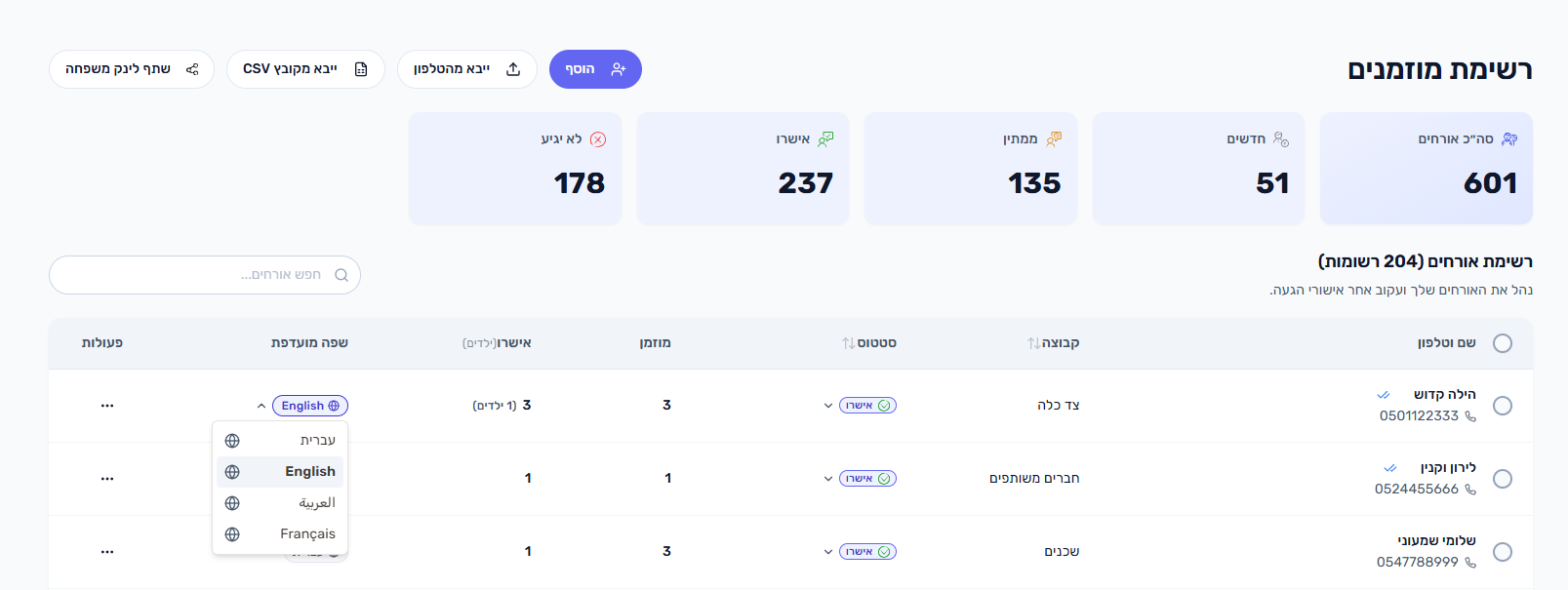
Easy Events keeps a preferred language on every guest. Each guest receives the WhatsApp message template in their language, and their personal RSVP page opens in the same language automatically.
What can you do?
- Set a preferred language per guest - Hebrew, English, Arabic, French, or Russian
- Send WhatsApp message rounds in each guest's language automatically
- Open each guest's personal RSVP page in their language
- Let new guests inherit a language automatically from your dashboard and the shared family page
- Change the language for many selected guests at once with a bulk action
- Fall back to Hebrew for any guest with no language set
How does it work?
- 1
Turn on guest languages
Open the Overview page and switch on 'Guest Languages'. It is off by default, so couples who message everyone in one language never see the extra options. Turning it on reveals the language selector in the guest list and the translation editor.
- 2
Set each guest's language
In the guest list, open the language selector next to a guest, or set it when adding or editing a guest. To update many guests at once, select them and use the bulk 'Change language' action.
- 3
Let it auto-fill
New guests get a language automatically - from the dashboard language you're viewing and from the language of the shared family page - so most of the list is already set.
- 4
Send the message round
Send your invitations as usual. Each guest receives the WhatsApp template in their language; guests with no language set receive Hebrew by default.
- 5
Guest opens the RSVP page
The personal link in the message opens the guest's RSVP page in the same language, so they confirm attendance comfortably.
Tips & Best Practices
Which languages are supported?
Hebrew, English, Arabic, French, and Russian. Each guest can have one preferred language, and both the message and their RSVP page use it.
What happens if a guest has no language set?
They receive Hebrew by default - both the WhatsApp message and the RSVP page open in Hebrew.
Do I have to set the language for every guest manually?
No. New guests inherit a language automatically from the dashboard language you're using and from the language of the shared family page. You only adjust the exceptions, and you can do that in bulk.
Does the RSVP page really open in the guest's language?
Yes. The personal link in each message opens that guest's RSVP page in their preferred language, matching the language of the message they received.
What if I don't turn this on?
Nothing changes. Every guest receives Hebrew, and the language options stay hidden across the guest list so they never get in your way. You can switch it on whenever you need it, and if you switch it back off your guests' languages and translations are kept for next time.