Guest Management
Full control over your guest list - from adding guests to tracking RSVPs
Planning an event requires managing dozens or hundreds of guests - who's coming, who's not, dietary preferences, and more. This can be a real headache with spreadsheets and manual lists.
With Easy Events, all your guest information is centralized in one place. You can see in real-time who has RSVPed, manage statuses, and share guest adding with family members.
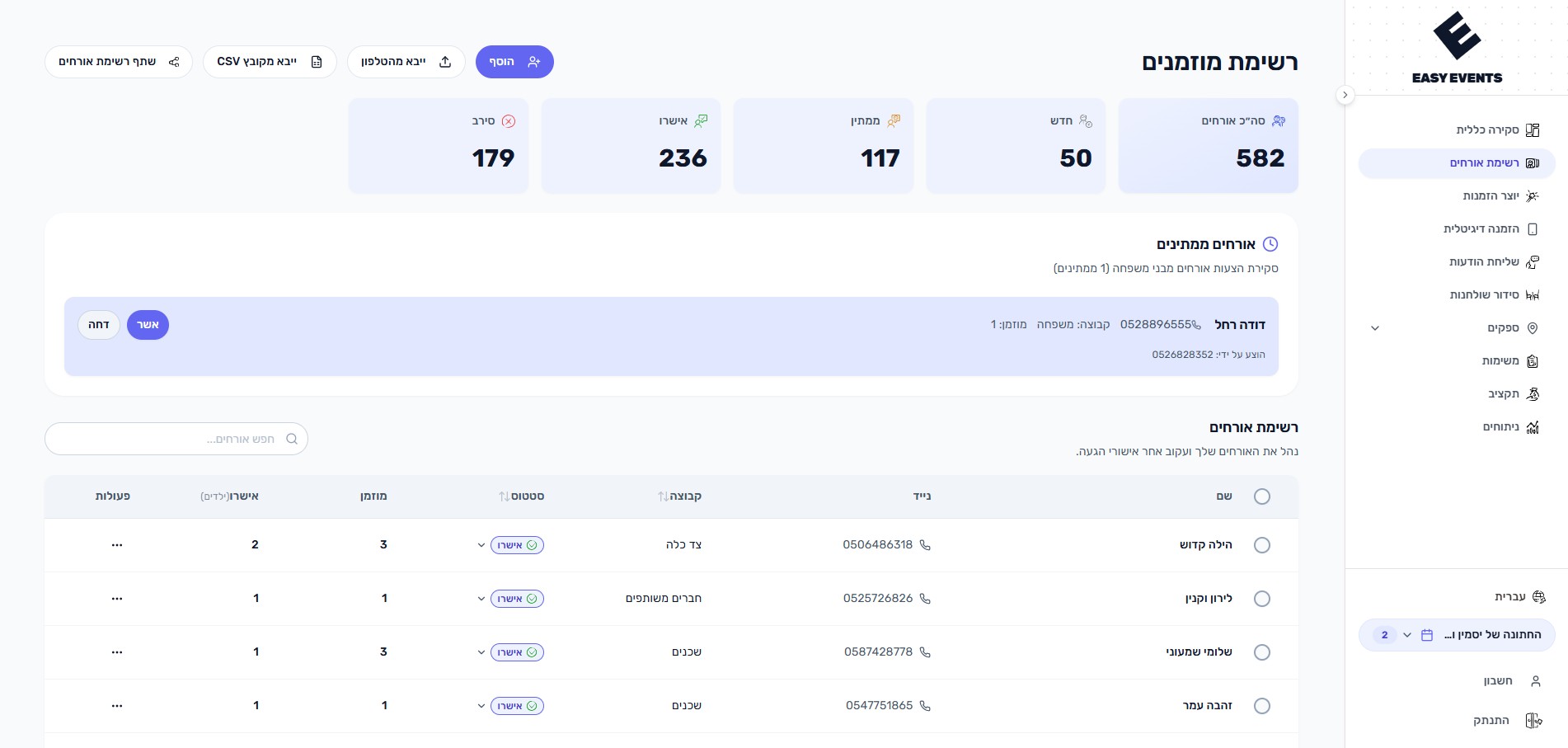
What can you do?
- Add guests manually or import from CSV files and phone contacts
- Track RSVP status with real-time stats (New, Pending, Confirmed, Declined)
- Manage dietary preferences - vegetarian, vegan, and special notes
- Track adults and children separately for accurate headcounts
- Group guests by side (bride/groom) and custom family groups
- Share a family link for relatives to suggest guests for your approval
- A log of the answers that changed - who took a reply back, confirmed fewer than they were invited for, or brought more (turned on from the account page)
- Set each guest's preferred language so their WhatsApp message and RSVP link match them bestLearn about guest languages
How does it work?
- 1
Add guests
Add guests manually, import from CSV, or sync directly from your phone contacts
- 2
Share with family
Send a family link so relatives can suggest additional guests for your approval
- 3
Approve suggestions
Review pending suggestions in a dedicated section and approve or decline with one click
- 4
Track and update
Monitor RSVPs in real-time with stats cards showing confirmed, pending, and declined counts
Tips & Best Practices
Can I import guests from Excel?
Yes! You can import guest lists from CSV files, phone contacts, or common formats from other platforms. The structure is easy to maintain, and there's a sample file to help you get started quickly.
What happens when someone adds a guest through the family link?
The suggested guest appears in a dedicated 'Pending Approval' section where you can review and approve or decline them.
Can I message each guest in their own language?
Yes. Switch on 'Guest Languages' on the Overview page first - it is off by default so it stays out of the way when everyone reads the same language. Once it's on, each guest has a preferred language (Hebrew, English, Arabic, French, or Russian) that you set when adding or editing a guest, inline in the guest list, or in bulk for several selected guests at once. When you send a message round, every guest receives the message template in their language, and their personal RSVP page opens in that language too. Guests with no language set default to Hebrew.
Learn about guest languages