Who Saw the Invitation
Two signals that show who saw your invitation - opening the invitation page and reading the WhatsApp message
You sent the invitations and some guests still haven't replied. Did they even see it?
There are two different signals: a blue ✓✓ on the guest list shows who opened their personal invitation page, and the message round summary shows who read the WhatsApp message. A guest can read the message without opening the page, so it's worth knowing both.
✓✓ on the guest list - who opened the invitation page
Your guest list shows a blue ✓✓ next to every guest who opened their personal invitation page. You can see who saw the invitation but hasn't answered yet, and who is worth a call.
- Blue ✓✓ next to a guest - they opened their personal invitation and RSVP page
- It appears on the first visit and stays, even if the guest hasn't answered yet
- On desktop, hover over the mark to see the date of the first visit
- No mark - the guest hasn't opened their personal link yet

- 1
Send the invitation
Each guest gets a personal link to their invitation page on WhatsApp.
- 2
The guest opens the page
As soon as the guest opens their personal link, we record their first visit.
- 3
The mark shows on your list
A blue ✓✓ appears next to the guest's name on the guest list.
- 4
Follow up with who hasn't replied
A guest with ✓✓ who hasn't RSVPed has seen the invitation - a good moment for a gentle reminder or a call.
Round summary - who read the WhatsApp message
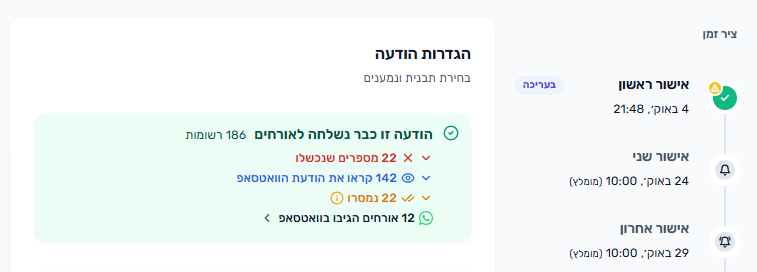
After a round is sent, its summary is updated from WhatsApp read receipts and shows how many guests read the message, and who they are.
- How many records got the message, how many were delivered and how many failed
- "N read the WhatsApp message" - tap it to open the list of guests who read it, with name and phone
- "N delivered" (in yellow) - the message reached the phone but no read receipt came back. The guest may not have opened it yet, or turned off read receipts in WhatsApp. Tap it to open the list of guests, with name and phone
- A guest who read the message also counts as delivered
- Every failed message shows its reason, such as a number that isn't on WhatsApp
- 1
Send a round
Send a message round from the Messages page.
- 2
WhatsApp reports back
When the message reaches the phone, WhatsApp reports it delivered. When the guest opens it, WhatsApp reports it read.
- 3
The summary updates
The reports are saved on the round. Refresh the Messages page to see the latest numbers.
- 4
See who read it
Tap "read the WhatsApp message" in the round summary to open the list of guests who read it.
Guest replies on WhatsApp
Some guests answer right in the message's chat - "two of us are coming", "sorry, we can't make it". A reply like that doesn't update the RSVP, but it isn't lost: it reaches you, and the guest gets their personal link back.
- On the Guests page, above the list, "Guest replies on WhatsApp" shows the guest's name, when they wrote and what they wrote
- The dashboard and each round's summary show "N guests replied on WhatsApp" - tap it to open the replies
- The guest gets an automatic answer with their personal RSVP link, in their language - once per round
- Once you've handled a reply, you can remove it from the list. The guest's details don't change

- 1
The guest replies in the chat
The guest writes back on WhatsApp instead of tapping the link.
- 2
The reply reaches you
The message is saved on the right guest and appears on the Guests page and in the round summary.
- 3
The guest gets their link
We automatically tell the guest their message was passed on to you, and send them their personal RSVP link.
- 4
Update the guest
If the guest wrote that they're coming or not, and hasn't confirmed through the link, update their status on the guest list.
Good to know
Does ✓✓ mean the guest read the WhatsApp message?
No. It means the guest opened their personal invitation page. You can see who read the WhatsApp message in the message round summary.
Why is there no mark next to a guest I'm sure saw the invitation?
They may have only read the WhatsApp message without tapping the link, used the general link, or seen the invitation on a family member's phone instead of through their own link.
If I open a guest's invitation to check it, will it mark them?
No. Opening it from the dashboard is a preview and isn't counted.
Does the mark disappear once the guest replies?
No. It shows the guest opened the page at least once, and it stays after they confirm or decline.
Why is the read count lower than the delivered count?
Some guests haven't opened the message yet, and some turned off read receipts in WhatsApp, so they don't report even when they read.
Does the number update by itself?
Reports are saved in the background all the time, but you need to refresh the Messages page to see them.
If a guest read the message, does that mean they RSVPed?
No. Read only means the message was opened. The RSVP shows in the guest's status on the guest list.
A guest wrote on WhatsApp that they're coming - why are they still pending?
A reply in the chat doesn't update the RSVP. You'll see it under "Guest replies on WhatsApp" on the Guests page, and the guest gets their personal link to confirm. You can also update their status yourself.